
For the office
The whole fleet, on one screen — with the cab's own numbers.
The portal reads the same records the drivers write. When dispatch and the driver look at the hours, they are looking at the same thing.
The portal
What the office can do.
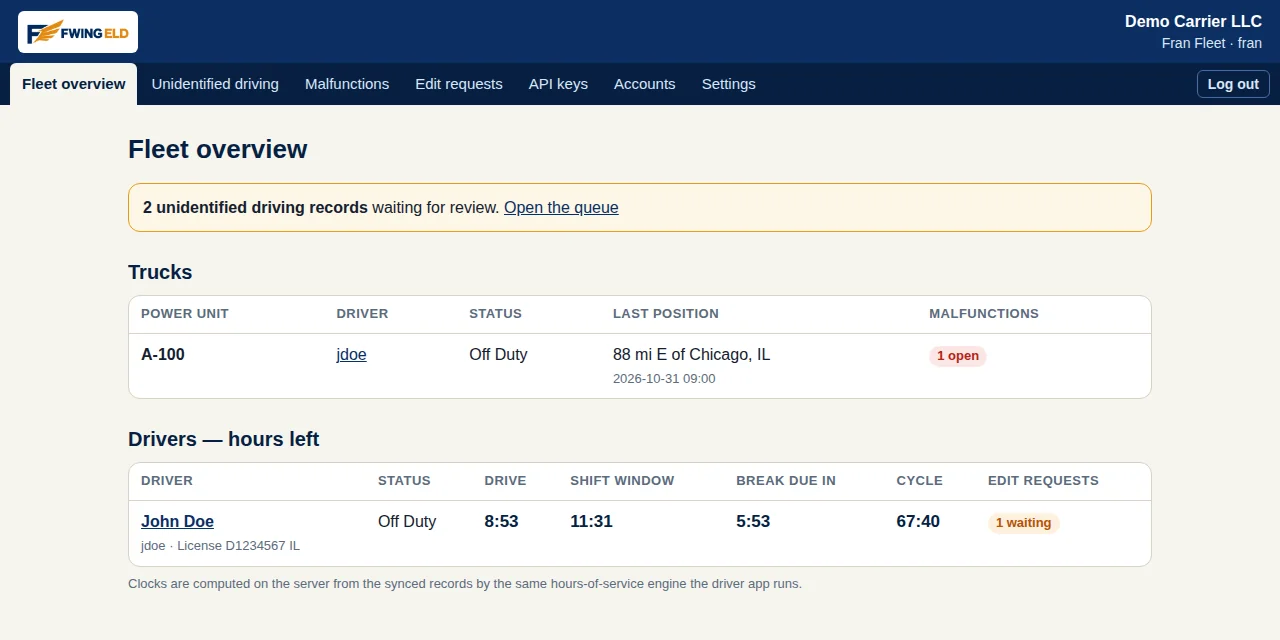
Every truck, every driver
Each truck with its current driver, its duty status, and where it last reported. Each driver with his four clocks — drive, shift window, break, week — worked out from his records by the same rules engine the app runs. Office and cab cannot disagree, because there is only one set of records.
Unidentified driving, sorted by people
Driving recorded with nobody signed in waits in a review queue. A person in your office assigns it to the driver it belongs to, or leaves a note beside it saying what it was. Nothing is reassigned silently, and nothing disappears.
Suggest a fix. The driver signs it.
Spot a mistake in a driver's day and you can propose the correction from the portal. It changes nothing until the driver approves it in his app. The portal has no way to rewrite a driver's record on its own — that is deliberate.
The malfunction board
Every open device problem across the fleet, truck by truck, with the history of when each one started and cleared. You see a sick device the day it gets sick, not at the next inspection.
Driver accounts, one per license
Your office creates the driver and support accounts. A driver account belongs to one driver's license, the way the rules ask. Support accounts can look and help, but they record nothing.
Records kept, and producible
Records are kept on FWING's server for at least six months, as the rules require, safe from a lost or broken phone. Ask for a driver's file for any period and the server builds the official output file from the stored records.
Broker connections
Brokers follow your trucks through our API — with a key we issue.
Brokers check on trucks through systems like Highway, the load boards, and their own tracking software. Those systems connect to FWING ELD through our API. For each connection, we issue an API key for your fleet.
- You choose what a key can see: a truck's live position only, position plus hours status, or the full record — set per key.
- A key can be switched off the moment it should be: a broker you stop working with loses access when you say so, not when their contract runs out.
- Every use is written down: the portal keeps a log of what each key asked for, allowed and refused alike.
Your records stay in your account. A key opens exactly the door you gave it, and no other.
Teams in the office
A team truck shows both drivers, each with his own numbers.
On a team truck the portal does not mash two logs into one. Each driver appears with his own status and his own clocks, and his day page holds only his records. Dispatch sees the pair the way the road runs them: one driving, one resting, each on his own time.
Run more than one truck?
Call us and tell us how your fleet runs — how many trucks, solo or teams, which broker systems you work with — and we'll take it from there. Rather write? The email works too.